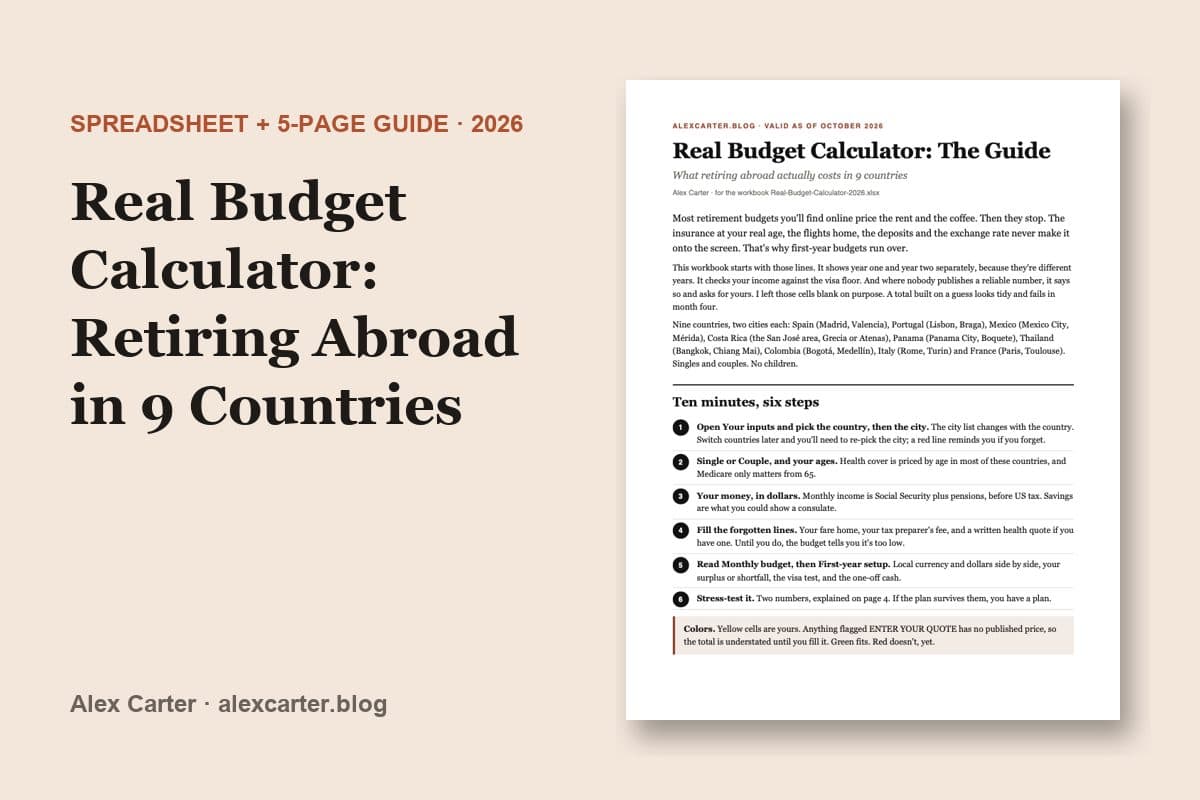
Real Budget Calculator: What Retiring Abroad Actually Costs in 9 Countries (2026)
For one adult or a couple, no children. Pick a country and city, enter your income: year 1 and year 2 budgets with the lines most budgets skip, your surplus or shortfall, and the visa income check.
- Instant download after payment.
- Secure checkout by Link (Stripe): pay by card, or by Apple Pay or Google Pay where your device offers them.
- Not useful? Email info@alexcarter.blog within 30 days of purchase and get a full refund. No questions asked.
- Checked: October 2026. Every figure lists its source.
Moving with children? The Families edition adds school, childcare, children's health cover, a bigger apartment and the visa floor for your whole family, with a remote-work route next to the passive one.
Most retire-abroad budgets price the rent and the coffee, then stop. This one starts with the lines they skip: health insurance at your real age, Medicare Part B, flights home, permit renewals, the exchange rate, and the deposit a landlord can legally hold.
Pick a country and a city, enter your income in dollars, and the spreadsheet does the rest. You get year one and year two in local currency and dollars, your monthly surplus or shortfall, and a check on whether your income clears the visa floor, with the savings route where a country has one.
Nine countries, two cities each, for singles and couples: Spain, Portugal, Mexico, Costa Rica, Panama, Thailand, Colombia, Italy and France. Every figure carries its source, link and date. Where nobody publishes a reliable number, the sheet asks for your own quote instead of guessing.
Valid as of October 2026. Visa floors and fees reset every January; for 12 months after you buy, the updated file comes free by email, to the address you paid with.
Who it's for
Americans who are choosing between countries, or between two cities in one country, and want a monthly number built on their own income rather than a "cost of living" average. It suits a single person or a couple of two adults. It doesn't cover children: no school, childcare or child health lines, and the visa tests count adults only.
It leaves out income tax in the new country, children, buying property and car ownership. It is a planning tool, not financial, tax, legal or immigration advice, and it can't know your consulate, your health history or your lease.
What's on each sheet
- Start here. Six steps and a color key: yellow cells are yours, green means it fits, red means not yet.
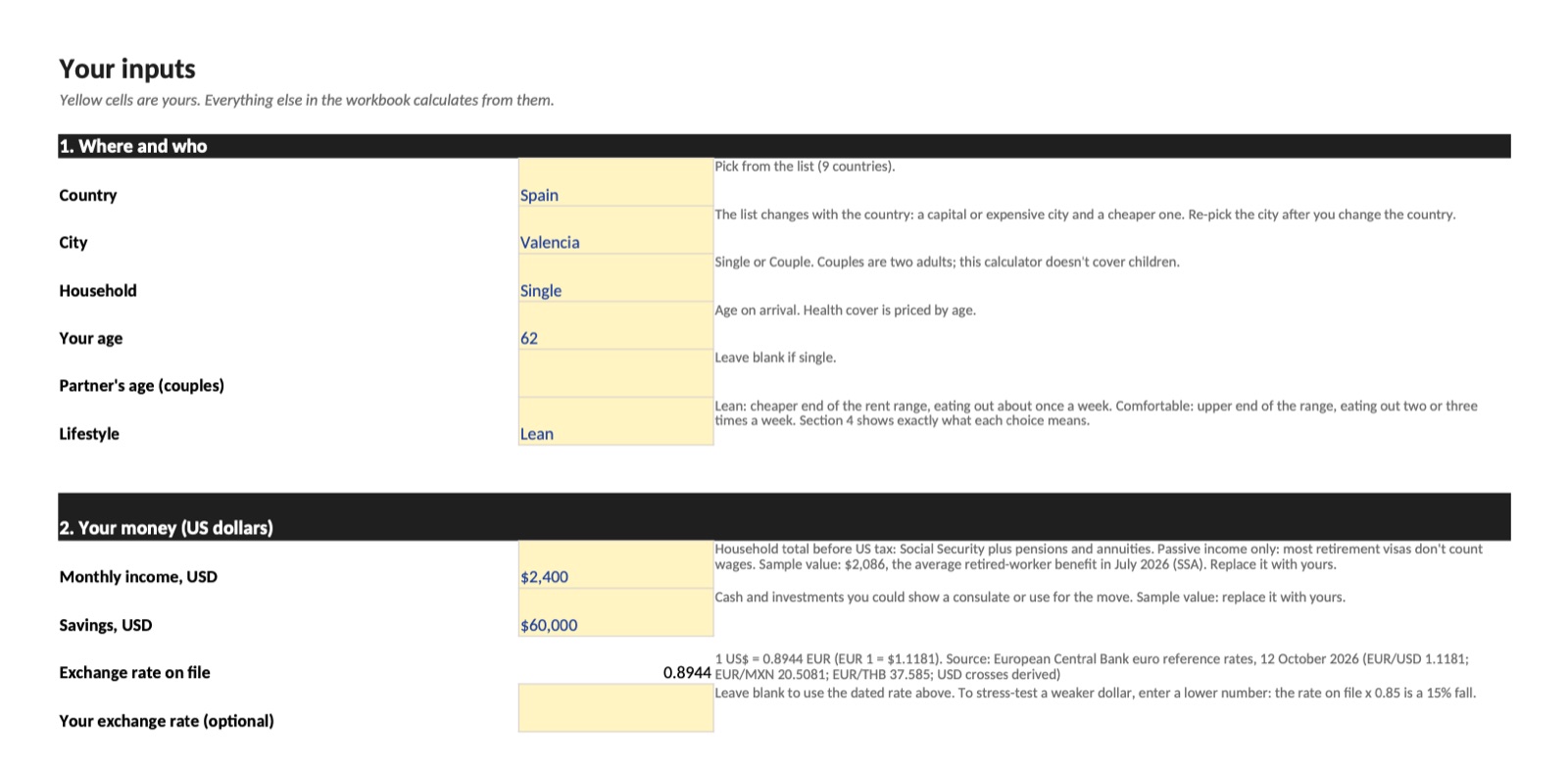
- Your inputs. Country, city, household, age, lifestyle (Lean or Comfortable), income and savings. Then the lines budgets forget, such as flights home, buffers, US tax preparation and your own quotes for insurance and rent.
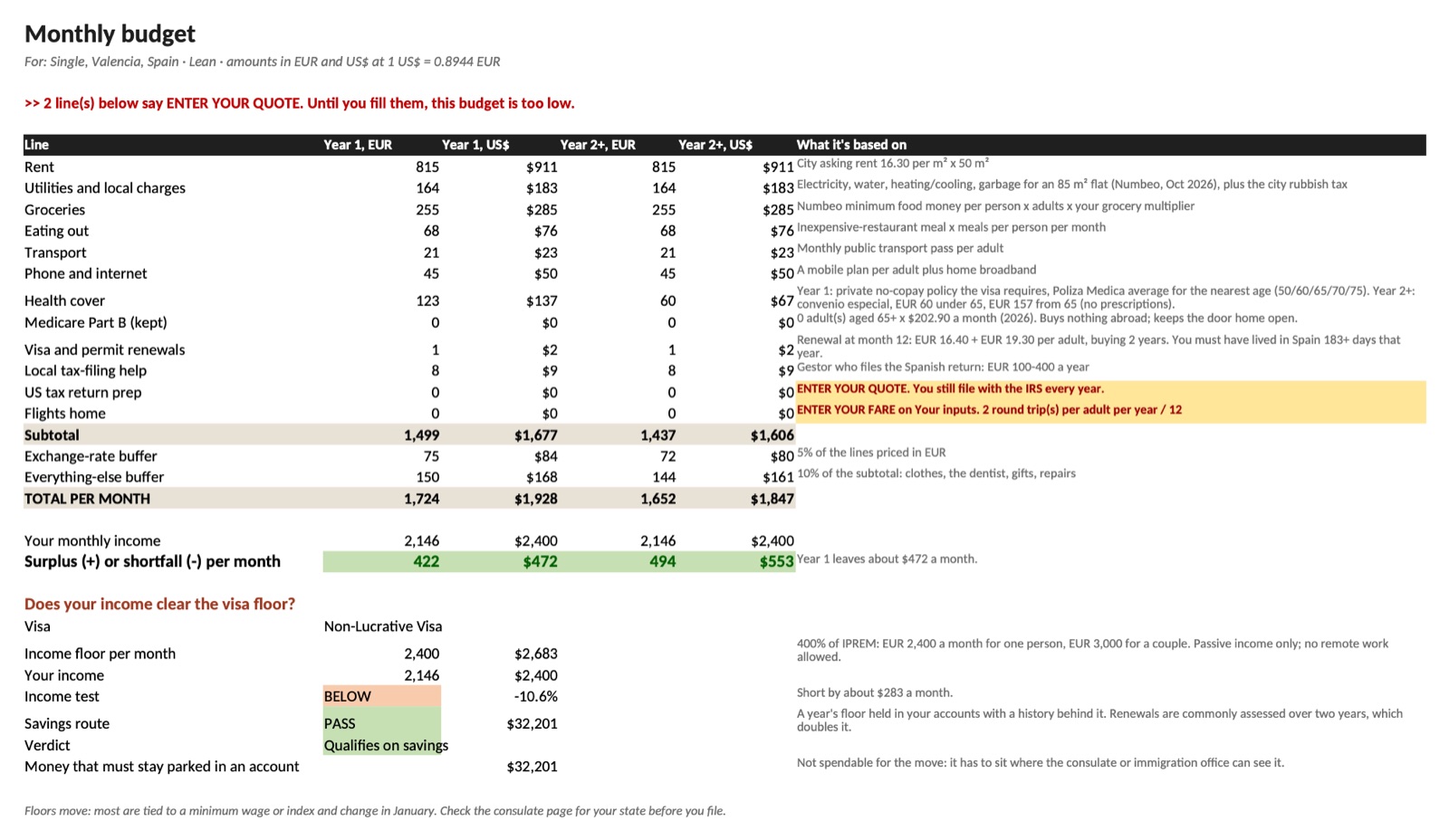
- Monthly budget. Rent, utilities, groceries, eating out, transport, phone, health cover, Part B, renewals, tax help and flights, for year 1 and year 2 and after. Then your surplus or shortfall and the visa income test.
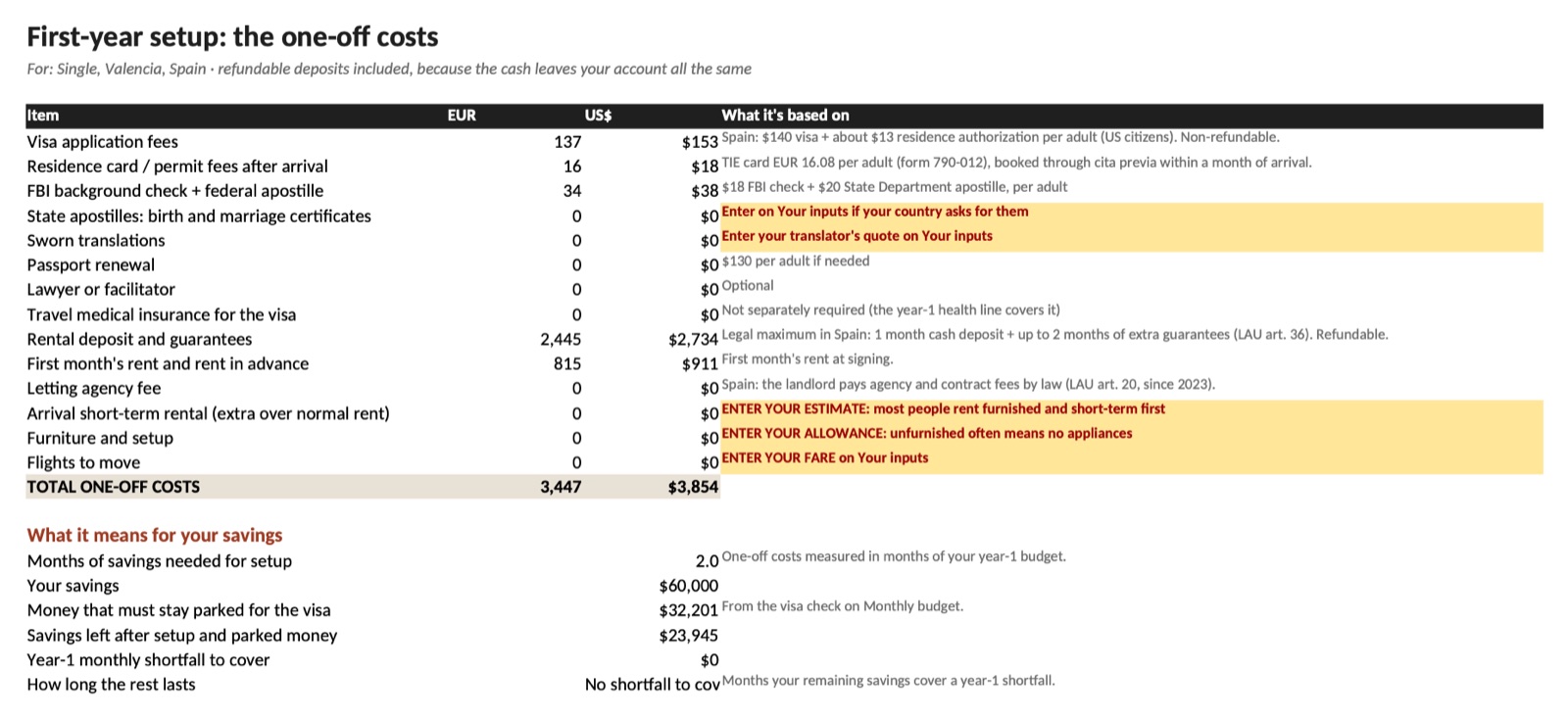
- First-year setup. Visa and permit fees, the FBI check and apostille, translations, deposits, first month's rent and furniture, turned into months of savings.
- Country data and Sources. Every figure with its link and date.
Where the numbers come from
Everything sits on the Country data sheet, valid as of October 13, 2026. Exchange rates are the European Central Bank reference rates of October 12, 2026, and the Colombian peso uses the official TRM of October 13. Visa floors come from consulate pages, such as the Embassy of Spain in Washington for the Non-Lucrative Visa and the Mexican consulate in San Diego for temporary residence. Fees come from the FBI ($18 for the Identity History Summary), the State Department ($20 per apostille, $130 adult passport renewal) and Medicare.gov ($202.90 Part B premium for 2026). City prices come from Idealista rent reports and Numbeo pages of October 2026.
Visa floors and fees reset, mostly in January, so check your consulate's page before you file.
Questions
Do I need Excel? No. It opens in Excel, in free LibreOffice, and in Google Sheets or Apple Numbers. It works best in Excel or LibreOffice; in Sheets and Numbers the City list may not follow the country, and then you type the city in.
Will it work on a Mac or a phone? On a Mac, yes: Excel, LibreOffice, Numbers or Google Sheets in the browser. A phone can open it in the Excel or Google Sheets app, but the sheets are wide, so filling it in is easier on a laptop or tablet.
What if my country or city isn't there? The calculator covers nine countries, two cities each, because every figure comes from that country's own sources. If yours isn't listed, it can't price it. For another city in a listed country, pick the closer match and check its rent line against real listings.
What if it isn't useful to me? Email info@alexcarter.blog within 30 days of purchase and get a full refund. No questions asked.
Will the numbers be updated? Visa floors and fees reset, mostly in January. For 12 months after you buy, the updated file comes free by email, to the address you paid with.
Why are some cells blank? Where no reliable published figure exists, the sheet asks for your own quote: round-trip airfare and US tax preparation, for example. Until you fill them, the total is too low, and the sheet says so.
See it before you buy
Example, straight from the calculator: a single retiree aged 62 in Valencia, Spain, on $2,400 a month with $60,000 in savings, Lean lifestyle, the airfare and US tax-prep lines still empty.
- Year 1: about $1,928 a month (EUR 1,724), which leaves about $472 a month.
- Year 2 and after: about $1,847 a month (EUR 1,652), once Spain's public health scheme replaces private cover, which leaves about $553.
- The visa test: Spain's Non-Lucrative Visa asks EUR 2,400 a month, and $2,400 falls about $283 short. The sheet then checks the savings route instead: about $32,201 has to sit in an account, and that money isn't spendable.
- One-off costs in the first year: about $3,854, mostly the rental deposit and the first month's rent.
Exchange rate: European Central Bank, October 12, 2026. Your own fare and tax-prep quote would raise the monthly total.
How to use it
What's in the download
One ZIP file, real-budget-calculator-2026.zip, with two files inside:
- Real-Budget-Calculator-2026.xlsx is the calculator. You type your numbers into it and read your budget from it.
- Real-Budget-Calculator-Guide.pdf is the 5-page guide. It explains each line of the budget and the five lines people forget. You read it; you don't type into it.
Step by step
- Download the ZIP. The download page opens as soon as you've paid.
- Unzip it. On a Mac, double-click the file. On Windows, right-click it and choose Extract All. You get a folder with the two files.
- Open Real-Budget-Calculator-2026.xlsx (which app: see below). The sheets are the tabs along the bottom.
- Go to Your inputs. Only the yellow cells are yours to change.
- Pick the Country, then the City (two per country), then Household (Single or Couple), your age and Lifestyle (Lean or Comfortable). If you change the country later, pick the city again.
- Type your monthly income in US dollars (Social Security plus pensions, before US tax) and your savings.
- Fill in the lines budgets forget: the round-trip fare home, US tax preparation, and your own health insurance or rent quote if you have one. A line that says ENTER YOUR QUOTE is still empty, and until you fill it the total is too low.
- Open Monthly budget. It shows year 1 and year 2+ in local currency and in dollars, the total per month and your surplus or shortfall. Below that, Does your income clear the visa floor? gives the floor, your income, PASS or not, the savings route and the money that must stay parked in an account.
- Open First-year setup for the one-off costs (fees, the FBI check, deposits, furniture) and how many months of savings they take.
- Stress-test it: on Your inputs, enter an exchange rate 15% lower than the one on file and a rent quote 10% higher. If the plan still holds, it's a plan.
What to open it with
- Microsoft Excel, Windows or Mac.
- LibreOffice Calc, free for Windows, Mac and Linux. The file was tested in it with other countries and incomes, and every sheet recalculated.
- Google Sheets, free: upload the .xlsx to Google Drive, then right-click it and choose Open with, then Google Sheets.
- Apple Numbers on a Mac: right-click the file and choose Open With, then Numbers.
It works best in Excel or LibreOffice. The formulas are plain ones (IF, INDEX, MATCH, SUM, MIN, MAX, TEXT) that Google Sheets and Numbers also handle. The one thing that can differ there is the City list, which changes with the country you pick: if it doesn't, type the city exactly as the Country / city column of the Country data sheet spells it, for example Mérida or San José area.
What's Inside
Details
Get Your Copy
Built from published official and public sources, described above. Valid as of October 2026.